3. Grafana Alloy Integration for SLES 16 System Monitoring
Feature Name |
Grafana Alloy Integration for SLES 16 System Monitoring |
Start Date |
Dec 22nd, 2025 |
Category |
Architecture, Monitoring |
PR |
Summary
This RFC proposes an approach to enable real-time system monitoring (CPU, memory) on SLES 16 hosts by integrating with Grafana Alloy, replacing the node_exporter-based solution currently used on SLES 15. The solution ensures both SLES 15 and SLES 16 are supported simultaneously, with conditional packaging and systemd configuration based on the target OS.
Goals
-
Maintain user experience parity: Trento users should have the same seamless monitoring experience on SLES 16 as on SLES 15; this considering both agent installation and server-side metrics consumption
-
Support both SLES versions: Trento must support both scenarios concurrently, as many customers will have mixed environments
-
Non-invasive integration: Trento-specific configuration should not interfere with existing Alloy configurations
-
User control over configuration: Users maintain full control over where and how Alloy configuration is deployed
Context
What are these metrics used for?
Trento collects real-time system metrics (CPU, memory, etc.) from monitored hosts to provide insights into resource utilization and performance. Trento uses the metrics collected by Prometheus to render CPU and Memory usage charts in the host detail view; such data is fetched just-in-time from the Prometheus server and is not stored nor integrated into host’s state for alerting or health evaluation.
Current Architecture: node_exporter-based
Trento currently achieves real-time system monitoring through the following architecture:
-
Each monitored host runs a
node_exporterinstance -
The
node_exporterruns as a systemd unit -
The Trento Agent declares the
node_exporteras a systemd dependency (Wants=andAfter=) -
Prometheus queries Trento Web to retrieve the list of
node_exporterendpoint for the hosts to monitor -
Prometheus pulls metrics from each
node_exporterendpoint -
Users do not need to manually configure or interact with the
node_exporter
This approach provides a seamless, zero-configuration experience for Trento users.
Incoming Architecture: alloy-based
SUSE Linux Enterprise Server 16 no longer ships the node_exporter package. Instead, SLES 16 adopts Grafana Alloy as the preferred telemetry collection agent.
Grafana Alloy is an OpenTelemetry Collector distribution that includes built-in Prometheus pipelines. Unlike node_exporter, which exposes metrics for Prometheus to pull, Alloy can push metrics directly to a Prometheus-compatible endpoint using prometheus.remote_write.
Detailed Design
Overview
-
The Trento Agent provides an explicit command (
trento-agent generate alloy) to produce Alloy configuration -
The generated configuration is printed to stdout, giving users full control over deployment
-
Two separate systemd unit files will be created: one for SLES 15 (using
node_exporter) and one for SLES 16 (usingalloy); the appropriate unit will be installed based on the target OS during RPM installation -
On
alloy-based systems, metrics will be pushed to Prometheus; Trento Web can continue to query Prometheus for metrics as before
High-Level Architecture
(systemd)"] TA15["Trento Agent
(metrics_provider: node_exporter)"] end subgraph SLES16["SLES 16 HOST"] ALLOY["Grafana Alloy
(systemd)"] TA16["Trento Agent
(metrics_provider: alloy)"] end PROM -->|"pull"| NE15 ALLOY -->|"push (HTTPS)"| EDGE EDGE -->|"proxy"| RW TA15 -->|"discovery"| WEB TA16 -->|"discovery"| WEB WEB -->|"query"| PROM style SERVER fill:#e1f5fe style SLES15 fill:#fff3e0 style SLES16 fill:#e8f5e9 style PROM fill:#bbdefb style EDGE fill:#ffecb3
Host Configuration
This section covers all configuration required on the monitored hosts (SLES 15 and SLES 16).
Alloy Configuration Generation Command
The Trento Agent provides an explicit command to generate the Alloy configuration. The agent does not write the configuration file directly; instead, it outputs the configuration to stdout, allowing users to review and deploy it as appropriate for their environment.
Command Options
Options can be passed as command-line flags, environment variables, or via the configuration file (following the standard Trento agent configuration patterns).
| Flag | Environment Variable | Required | Description |
|---|---|---|---|
|
|
No |
The Prometheus remote write endpoint URL (used in push mode with Alloy) |
|
|
No |
Authentication method: |
|
|
No |
Username for basic authentication |
|
|
No |
Password for basic authentication |
|
|
No |
Bearer token for bearer authentication |
|
|
No |
Path to CA certificate file for TLS verification |
|
|
No |
Path to client certificate file for mTLS authentication |
|
|
No |
Path to client private key file for mTLS authentication |
|
|
No |
Metrics scrape interval (default: |
|
|
No |
Override the automatically determined agent ID (use only for development/testing) |
The agent-id is automatically determined by the agent using the same mechanism as the start command. It can be overridden with --force-agent-id for development and testing purposes, but this should not be used in production.
|
Configuration File
Options can also be specified in the Trento agent configuration file:
# /etc/trento/agent.yaml

api-key: <api-key-generated-from-the-server>
server-url: https://trento.example.com
facts-service-url: amqp://guest:guest@localhost:5672

# Prometheus endpoint URL (used in push mode with Alloy)
prometheus-url: https://prometheus-url/api/v1/write
scrape-interval: 15s

# Authentication for Prometheus remote write endpoint
# Supported values: none, basic, bearer, mtls
# Default: bearer
prometheus-auth: bearer
prometheus-auth-bearer-token: <token>

# Alternative: Basic authentication
# prometheus-auth: basic
# prometheus-auth-username: trento
# prometheus-auth-password: <password>

# Alternative: mTLS authentication
# prometheus-auth: mtls
# prometheus-tls-ca-cert: /etc/trento/certs/ca.crt
# prometheus-tls-client-cert: /etc/trento/certs/client.crt
# prometheus-tls-client-key: /etc/trento/certs/client.key
Usage Examples
trento-agent generate alloytrento-agent generate alloy \
--prometheus-url "https://trento.example.com/api/v1/write"trento-agent generate alloy \
--prometheus-url "https://trento.example.com/api/v1/write" \
--prometheus-auth bearer \
--prometheus-auth-bearer-token "my-secret-token"trento-agent generate alloy \
--prometheus-url "https://trento.example.com/api/v1/write" \
--prometheus-auth basic \
--prometheus-auth-username trento \
--prometheus-auth-password "secret"trento-agent generate alloy \
--prometheus-url "https://trento.example.com/api/v1/write" \
--prometheus-auth mtls \
--prometheus-tls-ca-cert /etc/trento/certs/ca.crt \
--prometheus-tls-client-cert /etc/trento/certs/client.crt \
--prometheus-tls-client-key /etc/trento/certs/client.keyTRENTO_PROMETHEUS_URL="https://trento.example.com/api/v1/write" \
TRENTO_PROMETHEUS_AUTH="bearer" \
TRENTO_PROMETHEUS_AUTH_BEARER_TOKEN="my-secret-token" \
trento-agent generate alloytrento-agent generate alloy \
| sudo tee /etc/alloy/config.d/trento.alloy > /dev/null
sudo chown alloy:alloy /etc/alloy/config.d/trento.alloy
sudo chmod 640 /etc/alloy/config.d/trento.alloy
sudo systemctl reload alloySystemd Unit Files
Proposed Solution: Single Unit File Without Dependencies
A single systemd unit file is used for both node_exporter-based and alloy-based systems, with no explicit service dependencies.
[Unit]
Description=Trento agent service

[Service]
ExecStart=/usr/bin/trento-agent start
Type=simple
User=root
Restart=on-failure
RestartSec=5

[Install]
WantedBy=multi-user.target
With this approach:
Users will take care of their own configurations and service management for node_exporter or alloy depending on the target platform. We can provide dedicated Trento Checks to ensure the proper setup as well as documentation to guide users through the process.
Users deploy the Alloy configuration manually on SLES 16:
# Generate and deploy Alloy configuration
trento-agent generate alloy > /etc/alloy/config.d/trento.alloy
chown alloy:alloy /etc/alloy/config.d/trento.alloy
chmod 640 /etc/alloy/config.d/trento.alloy

# Start or reload Alloy
systemctl start alloy
systemctl reload alloy

# Start Trento agent
systemctl start trento-agent
Configuration File Requirements
For alloy-based systems, prometheus-mode must be set to push and prometheus-url must point to the Prometheus remote write endpoint. The generate alloy command reads these settings from the configuration file. Authentication settings are required for production deployments (bearer token is the default):
# /etc/trento/agent.yaml

api-key: <api-key-generated-from-the-server>
server-url: https://trento.example.com
facts-service-url: amqp://guest:guest@localhost:5672

# Prometheus exporter configuration
prometheus-mode: push  # push for Alloy, pull for node_exporter
prometheus-url: https://prometheus-url/api/v1/write  # reverse-proxied via nginx/Ingress
prometheus-exporter-name: grafana_alloy  # optional, defaults to grafana_alloy in push mode, node_exporter in pull mode
scrape-interval: 15s  # optional, defaults to 15s

# Authentication for Prometheus remote write endpoint (bearer is the default)
prometheus-auth: bearer
prometheus-auth-bearer-token: <token>
For node_exporter-based systems (SLES 15), use pull mode configuration:
# /etc/trento/agent.yaml

api-key: <api-key-generated-from-the-server>
server-url: https://trento.example.com
facts-service-url: amqp://guest:guest@localhost:5672

# Prometheus exporter configuration for pull mode (default)
prometheus-mode: pull  # or omit this line, defaults to pull
prometheus-node-exporter-target: http://localhost:9100/metrics  # optional, auto-discovered if not specified
prometheus-exporter-name: node_exporter  # optional, defaults to node_exporter in pull mode
Backward Compatibility
To maintain backward compatibility with existing installations:
-
prometheus-modedefaults topullif not specified -
prometheus-exporter-namedefaults to:-
node_exporterin pull mode -
grafana_alloyin push mode
-
-
prometheus-node-exporter-targetis used in pull mode (where Prometheus pulls from node_exporter) -
prometheus-urlis used in push mode (where Alloy pushes to Prometheus) -
If the mode is
pull, theprometheus-urlflag is ignored -
If the mode is
push, theprometheus-node-exporter-targetflag is ignored
The agent will fail to start with a clear error message if:
* prometheus-mode is push but prometheus-url is not provided
* The configuration contains ambiguous or conflicting settings
The configuration file contains sensitive credentials. Ensure it has appropriate permissions (chmod 600 /etc/trento/agent.yaml).
|
Alternative Naming: Unified URL Parameter
An alternative configuration design was considered using a single prometheus-exporter-url parameter for both push and pull modes instead of separate prometheus-url and prometheus-node-exporter-target flags. This approach would use --prometheus-exporter-url whose meaning would be context-dependent: pointing to the Prometheus remote write endpoint in push mode, or to the node_exporter target in pull mode.
Alternative Solution: Conditional Unit Files With Automatic Dependency Management
For environments where automatic dependency management and configuration deployment are desired, two separate systemd unit files can be used based on the target platform.
Using node_exporter (packaging/systemd/trento-agent.service)
[Unit]
Description=Trento agent service
Wants=prometheus-node_exporter.service
After=prometheus-node_exporter.service

[Service]
ExecStart=/usr/bin/trento-agent start
Type=simple
User=root
Restart=on-failure
RestartSec=5

[Install]
WantedBy=multi-user.target
Using alloy (packaging/systemd/trento-agent-alloy.service)
[Unit]
Description=Trento agent service
Wants=alloy.service
After=alloy.service

[Service]
ExecStartPre=-/usr/share/trento/configure-alloy.sh
ExecStart=/usr/bin/trento-agent start
Type=simple
User=root
Restart=on-failure
RestartSec=5

[Install]
WantedBy=multi-user.target
The ExecStartPre directive runs the configure-alloy.sh script, which generates and deploys the Alloy configuration before starting the agent. The script reads prometheus-url and other options from the configuration file (/etc/trento/agent.yaml). The agent-id is automatically determined.
|
Alloy Configuration Script (packaging/scripts/configure-alloy.sh)
The script handles Alloy configuration generation, file permissions, and service reload:
#!/bin/bash
# configure-alloy.sh - Generate and deploy Trento Alloy configuration
#
# This script is executed by systemd before starting the trento-agent service.
# It generates the Alloy configuration, sets appropriate permissions, and
# reloads the Alloy service.

set -euo pipefail

ALLOY_CONFIG_DIR="/etc/alloy/config.d"
ALLOY_CONFIG_FILE="${ALLOY_CONFIG_DIR}/trento.alloy"
ALLOY_USER="alloy"
ALLOY_GROUP="alloy"

# Ensure the config directory exists
mkdir -p "${ALLOY_CONFIG_DIR}"

# Generate the Alloy configuration
/usr/bin/trento-agent generate alloy > "${ALLOY_CONFIG_FILE}"

# Set ownership and permissions
chown "${ALLOY_USER}:${ALLOY_GROUP}" "${ALLOY_CONFIG_FILE}"
chmod 640 "${ALLOY_CONFIG_FILE}"

# Reload Alloy to pick up the new configuration
systemctl reload alloy

echo "Trento Alloy configuration deployed to ${ALLOY_CONFIG_FILE}"
Open Build Service Packaging
Proposed Solution: Single Unit File Installation
The RPM spec file installs a single systemd unit file for all SLES versions (as it is now, no modifications needed).
%install Section%install
# Install the binary
install -D -m 0755 %{binaryname} "%{buildroot}%{_bindir}/%{binaryname}"
# Install the systemd unit (same for all versions)
install -D -m 0644 packaging/systemd/trento-agent.service \
%{buildroot}%{_unitdir}/trento-agent.service%files Section%files
%{_bindir}/%{binaryname}
%{_unitdir}/trento-agent.serviceAlternative Solution: Conditional Installation Based on SLES Version
For the alternative approach with automatic dependency management, the RPM spec file conditionally installs the appropriate systemd unit and supporting scripts based on the target SLES version using OBS macros.
%install Section%install
# Install the binary
install -D -m 0755 %{binaryname} "%{buildroot}%{_bindir}/%{binaryname}"
# Install the appropriate systemd unit based on SLES version
%if 0%{?sle_version} >= 160000
# SLES 16 and later: use Alloy-based service
install -D -m 0644 packaging/systemd/trento-agent-alloy.service \
%{buildroot}%{_unitdir}/trento-agent.service
# Install the Alloy configuration script
install -D -m 0755 packaging/scripts/configure-alloy.sh \
%{buildroot}%{_datadir}/trento/configure-alloy.sh
%else
# SLES 15 and earlier: use node_exporter-based service
install -D -m 0644 packaging/systemd/trento-agent.service \
%{buildroot}%{_unitdir}/trento-agent.service
%endif%files Section%files
%{_bindir}/%{binaryname}
%{_unitdir}/trento-agent.service
%if 0%{?suse_version} >= 1600
%{_datadir}/trento/configure-alloy.sh
%endif
The suse_version and sle_version macros are provided by OBS and contain the SLES version as an integer (e.g., 150000 for SLES 15, 1600 for SLES 16). As per documentation, SLES 16 currently doesn’t use the sle_version macro. See https://en.opensuse.org/openSUSE:Build_Service_cross_distribution_howto
|
Alloy Configuration Strategy
Grafana Alloy uses a configuration language to define how components collect, transform, and send data. Alloy configuration is written in files with the .alloy extension, typically located in /etc/alloy/. Alloy supports loading a single configuration file or multiple files from a directory; in the latter case, all files are merged together. See https://grafana.com/docs/alloy/latest/reference/cli/run/.
To use Alloy with Trento, a tailor-made configuration is required. SLES 16 ships Alloy with a default configuration file located at /etc/alloy/config.alloy. Trento users will have to choose their preferred approach to manage Alloy configuration:
1. Single configuration file: Users will append the Trento-specific configuration to the existing /etc/alloy/config.alloy file.
2. Import configuration file: Users will place the Trento-specific configuration in a separate file (e.g., /etc/alloy/trento.alloy) and include it in the main configuration using the import directive. See https://grafana.com/docs/alloy/latest/reference/config-blocks/import.file/.
3. Configuration directory: Users will place the Trento-specific configuration in a separate file (e.g., /etc/alloy/trento.alloy) and tell Alloy to automatically load all *.alloy files from the /etc/alloy directory; this can be setup by overriding the CONFIG_FILE environment variable in the alloy.service systemd unit using a systemd drop-in file. See https://www.freedesktop.org/software/systemd/man/latest/systemd.unit.html.
| Either approach consider all components defined in the Trento configuration must have unique names across all configuration files to avoid conflicts. |
Alloy Configuration Template
The Alloy configuration is embedded in the Trento Agent binary as a Go template. The template conditionally includes authentication blocks based on the configured authentication method.
internal/agent/templates/trento.alloy.tmpl)// =============================================================================
// Trento System Metrics Configuration
// Generated by: trento-agent generate alloy
// Agent ID: {{ .AgentID }}
//
// This file is managed by Trento. Manual changes may be overwritten.
// =============================================================================
// Collect system metrics (CPU, memory, etc.) using the built-in unix exporter
prometheus.exporter.unix "trento_system" {
set_collectors = [
"cpu",
"cpufreq",
"loadavg",
"meminfo",
"filesystem",
"netdev",
"uname",
]
}
// Relabel metrics for Trento identification
discovery.relabel "trento_system" {
targets = prometheus.exporter.unix.trento_system.targets
rule {
target_label = "agentID"
replacement = "{{ .AgentID }}"
}
rule {
target_label = "exporter_name"
replacement = "grafana_alloy"
}
}
// Scrape the system metrics
prometheus.scrape "trento_system" {
targets = discovery.relabel.trento_system.output
forward_to = [prometheus.remote_write.trento.receiver]
scrape_interval = "{{ .ScrapeInterval }}"
}
// Push metrics to Trento server's Prometheus endpoint
prometheus.remote_write "trento" {
endpoint {
url = "{{ .PrometheusURL }}/api/v1/write"
{{- if eq .AuthMethod "basic" }}
basic_auth {
username = "{{ .AuthUsername }}"
password = "{{ .AuthPassword }}"
}
{{- else if eq .AuthMethod "bearer" }}
bearer_token = "{{ .AuthBearerToken }}"
{{- end }}
tls_config {
insecure_skip_verify = false
{{- if .TLSCACert }}
ca_file = "{{ .TLSCACert }}"
{{- end }}
{{- if eq .AuthMethod "mtls" }}
cert_file = "{{ .TLSClientCert }}"
key_file = "{{ .TLSClientKey }}"
{{- end }}
}
}
}
The agentID label is critical for correlating metrics with specific Trento-managed hosts. This label MUST be present on all metrics pushed to the Trento server.
|
Trento Server Modifications
This section covers modifications required on the Trento Server to support both node_exporter and Alloy-based hosts.
Host Discovery Workflow
The host discovery workflow must be updated to accept hosts that declare their metrics provider type. Each host will exclusively use either node_exporter-based or alloy-based.
Host Discovery Payload
There is the need to differentiate between node_exporter-based and alloy-based hosts in the discovery payload sent by the Trento Agent.
For the sake of keeping compatibility with existing installations, the payload will be extended by adding fields only instead of changing existing ones.
Specifically, the prometheus_mode field is added providing the mode the agent is expecting to operate; it is set explicitly via the prometheus-mode configuration key (defaulting to pull). Trento server can interpret a missing field as pull mode, and that is safe for existing installations.
The field prometheus_targets is kept for backward compatibility, too. The key in the map is determined by the prometheus-exporter-name configuration (defaulting to node_exporter in pull mode or grafana_alloy in push mode), and the value is the target address:
* In pull mode: configured via prometheus-node-exporter-target (or auto-discovered from the host’s lowest IPv4 address if not specified)
* In push mode: configured via prometheus-url
{
    [...]
    "prometheus_targets": { "<prometheus-exporter-name>": "<target-address>" },
    "prometheus_mode": "push" | "pull",
}
Prometheus Configuration
This section covers Prometheus configuration required on the Trento Server to accept push-based metrics from Alloy.
Enable Remote Write Receiver
Prometheus must be configured to accept remote write requests from Alloy agents.
Configuration Option
Run prometheus with the web.enable-remote-write-receiver option enabled.
See https://prometheus.io/docs/specs/prw/remote_write_spec_2_0/
prometheus --web.enable-remote-write-receiverCommand Line Option
Alternatively, start Prometheus with:
prometheus --web.enable-remote-write-receiver| Prometheus configuration is not impacted by the authentication method nor TLS management. They are both handled at the edge (reverse proxy or Kubernetes Ingress), not by Prometheus itself. Prometheus only needs to enable the remote write receiver; all TLS termination and credential validation happens at the edge layer. See the Authentication section for more details. |
Authentication
Authentication for the Prometheus remote write endpoint is handled at the edge layer (reverse proxy or Kubernetes Ingress), not by Prometheus itself. Such a separation of concerns provides better security and flexibility for the users to choose their preferred authentication method.
Supported Client Authentication Methods
The Trento agent can generate Alloy configurations for the following authentication methods. The edge layer must be configured to validate these credentials.
| Method | prometheus-auth value |
|---|---|
None |
|
Bearer Token |
|
Basic Authentication |
|
Mutual TLS (mTLS) |
|
When prometheus-auth is set to none, the generated Alloy configuration will not include any authentication blocks. This is suitable only for:
-
Development/testing environments
-
Fully isolated networks with no external access
| Running without authentication in production is not recommended. Anyone with network access could push arbitrary metrics to Prometheus. |
Trento Out-of-the-Box Installations
For Trento’s provided installation methods, we want to provide a sane default configuration that does not add unwanted operational effort for the average user, while allowing advanced users to customize the setup as needed.
We will provide a default configuration where bearer token authentication in place on both ansible playbook and helm chart installation scripts.
For both scenarios we configure the reverse proxy to validate bearer tokens for the Prometheus remote write endpoint. The token is meant to be long-lived and static, as it is used by multiple agents.
Handling Edge Cases
SLES 15 SP7
SLES 15 SP7 introduces Grafana Alloy as an optional package. The Trento Agent must continue using node_exporter on SLES 15 systems, regardless of Alloy availability.
SLES 15 SP7 users that wish to use Alloy must manually configure it outside of Trento’s management. We must document this scenario accordingly.
Alloy Already Running with Existing Configuration
When Alloy is already running with user-defined configuration:
-
The Trento configuration file is added to the
config.d/directory -
Alloy configuration is reloaded via
systemctl reload -
Alloy merges all
*.alloyfiles from the directory
Component names must be unique across all configuration files. The Trento configuration uses the trento_ prefix to avoid conflicts:
|
-
prometheus.exporter.unix "trento_system" -
prometheus.scrape "trento_system" -
prometheus.remote_write "trento"
Alloy Not Installed on alloy-based Systems
With the proposed solution (single unit file without dependencies), the Trento Agent will start successfully even if Alloy is not installed or not running. However, system metrics will not be available until Alloy is properly installed and configured.
With the alternative solution (conditional unit files with dependencies), the systemd unit will fail to start due to missing alloy.service dependency, clearly indicating the requirement for Alloy to be installed and running.
Configuration Conflicts
If the Trento configuration conflicts with existing user configuration:
-
Alloy will fail to load and report an error
-
The Trento Agent should detect this failure and log actionable information
-
Users may need to review and adjust their existing configuration
Configuration Regeneration
The Trento configuration should be regenerated when:
-
The Prometheus endpoint URL changes
-
The agent is upgraded to a new version with template changes
With the proposed solution (manual deployment), users regenerate the configuration by running:
trento-agent generate alloy > /etc/alloy/config.d/trento.alloy
chown alloy:alloy /etc/alloy/config.d/trento.alloy
systemctl reload alloy
With the alternative solution (systemd unit with ExecStartPre), restarting the service will automatically regenerate the configuration:
systemctl restart trento-agentRemoving Trento Agent from alloy-based Systems
When Trento agent is uninstalled:
-
Remove
/etc/alloy/config.d/trento.alloy -
Reload Alloy configuration
-
Alloy continues operating with remaining configurations
This cleanup should be handled in the RPM %postun scriptlet:
%postun
%if 0%{?sle_version} >= 160000
rm -f /etc/alloy/config.d/trento.alloy
systemctl reload alloy 2>/dev/null || true
%endif
%systemd_postun_with_restart trento-agent.service
Trento UI Modifications
Exporter status indication
Currently, Trento Web shows the status of node_exporter for each host. The status is checked by querying Prometheus for up{agentID=…}. See https://github.com/trento-project/web/blob/0dee8297dbdf4e6d43197e4d52d8617e70f49df7/lib/trento/infrastructure/prometheus/adapter/prometheus_api.ex#L109. The status indicates whether Prometheus is able to scrape metrics from the host.
Using the write API, Prometheus cannot ensure the up query has the same meaning as it now depends on the pusher. In the case of Alloy, it will always be 1 as long as Alloy is running and able to push metrics. This is not the same, but an acceptable approximation.
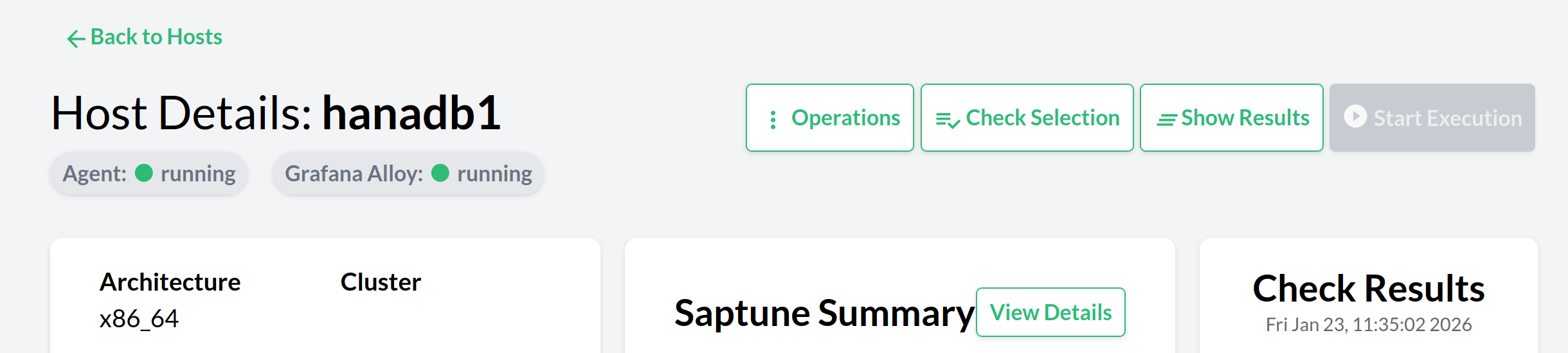
On the Trento Web UI we can have a consistent experience by showing the same status indication for both node_exporter-based and alloy-based hosts. By labeling metrics with exporter_name, the pill will be shown as expected by the current implementation, without further changes:
Expected Exporters
A host’s prometheus_targets field (populated during discovery) declares which exporters are expected to be active for that host. The exporter status evaluation uses this information to surface exporters that are not reporting to Prometheus at all, which the up query alone cannot detect.
The logic works as follows:
-
The
prometheus_targetsmap is read from the host’s read model. Each key in the map is an exporter name (e.g.,node_exporter,ha_cluster_exporter,grafana_alloy). -
A baseline map is constructed from these keys, with every expected exporter set to
:critical. -
Prometheus is queried with
up{agentID=…}and the results are parsed into a map of exporter names to their actual status (:passing,:critical, or:unknown). -
The parsed query results are merged over the baseline map, so that any exporter reported by Prometheus retains its queried status, while any expected exporter absent from the query results remains
:critical.
This means:
-
An exporter that is expected but never scraped or pushed will appear as
:critical, even if Prometheus has no record of it at all. -
An exporter that Prometheus reports as up (
"1") will appear as:passing, regardless of whether it was in the expected list. -
Exporters present in query results but not in
prometheus_targetsare still included in the output (the merge is not restrictive). -
Hosts with a
nilprometheus_targets(e.g., legacy agents that have not yet sent this field) behave exactly as before: only exporters present in the Prometheus query results are reported.
node_exporter-based setups will keep using the default "node_exporter" label; alloy-based setups will use the grafana_alloy.
Open Questions
Which approach should be implemented?
The RFC presents two approaches:
-
Proposed Solution (Manual deployment): Single unit file with no dependencies. Users manually start node_exporter or alloy depending on platform. Simpler packaging, more explicit control.
-
Alternative Solution (Automatic deployment): Conditional unit files with automatic dependency management and configuration deployment via
ExecStartPre. Better user experience, but more complex packaging and less control.
The proposed solution prioritizes simplicity and user control, while the alternative solution prioritizes convenience and automation.
Summary of Changes
| Action | Target | Description |
|---|---|---|
Add CLI command |
Trento Agent |
Implement "trento-agent generate alloy" to render the Alloy configuration to stdout using agent state, flags, environment and config file. |
Change host discovery payload |
Trento Agent |
Extend host discovery payload to include metrics provider type (node_exporter or alloy). |
Change agent configuration file |
Trento Agent |
Add |
Systemd unit file approach |
Trento Agent (rpm) |
Proposed: Install single trento-agent.service for all SLES versions with no dependencies. Alternative: Conditionally install trento-agent-alloy.service for SLES 16+ and trento-agent.service (with node_exporter dependencies) for SLES 15 using sle_version macro. |
Alloy configuration deployment |
Trento Agent (rpm) |
Proposed: Users manually run "trento-agent generate alloy" and deploy configuration. Alternative: Install configure-alloy.sh script to /usr/share/trento/ for SLES 16+ that automatically generates /etc/alloy/config.d/trento.alloy via ExecStartPre, sets alloy:alloy ownership and 0640 permissions, then reloads alloy. |
Prometheus remote write enablement |
Trento helm chart / nginx config |
Enable Prometheus remote_write_receiver and route TLS/auth termination to the edge (nginx/Ingress) so Alloy can push metrics securely. |
Prometheus remote write auth |
Trento helm chart / nginx config |
Configure nginx/Ingress to validate bearer tokens (default) for Prometheus remote write endpoint. |
Discovery and targets API update |
Trento Web |
Extend host discovery payload to include metrics provider type and update targets API to filter out alloy-based hosts from node_exporter lists. |
Uninstall cleanup |
RPM %postun scriptlet |
Proposed: Users manually remove /etc/alloy/config.d/trento.alloy and reload alloy. Alternative: RPM scriptlet automatically removes /etc/alloy/config.d/trento.alloy and reloads alloy on uninstall for SLES 16+ (best-effort). |
Documentation and guidance |
Docs repository |
Document usage examples, security recommendations (avoid none in production), SLES 15 SP7 behavior, conflict handling and regeneration steps. |
Appendix: keep the configuraiton consistent
There are some possibilities to leverage Trento’s features to help user keeping the Alloy configuration consistent with the server settings, for example: * Have a Trento Check to periodically verify that the Alloy configuration matches the expected settings (e.g., Prometheus URL, authentication method) * Use Trento operations to configure/reconfigure the Alloy settings remotely
Such possibilities are out of the scope of this RFC, but can be considered for future improvements.